MoveitPro+ · Ads & Attribution
Know What Every Ad Dollar Booked.
Connect Google Ads and Meta. Every lead is tied to the exact click, campaign and keyword that brought it in, and every booked move counts as real revenue on the campaign that earned it.
Clicks Aren't Customers
Your Ads Know Who Clicked. Not Who Booked.
Google and Meta will report clicks and “conversions” all day. A conversion is a form fill. What they can't see is which of those people booked a move, and what it paid. That lives in your moving software, so that's where the reporting belongs.
Form fills aren't revenue.
A campaign that fills your inbox with tire-kickers looks great in the ad platform and loses you money in real life.
Spreadsheets go stale.
Matching bookings to ads by hand once a month means you find the wasted spend a month after you spent it.
The algorithm learns the wrong lesson.
Bidding that only sees form fills goes looking for more form fills. Show it booked moves and it goes looking for customers.
Real ROAS
Revenue From Booked Moves. Not Form Fills.
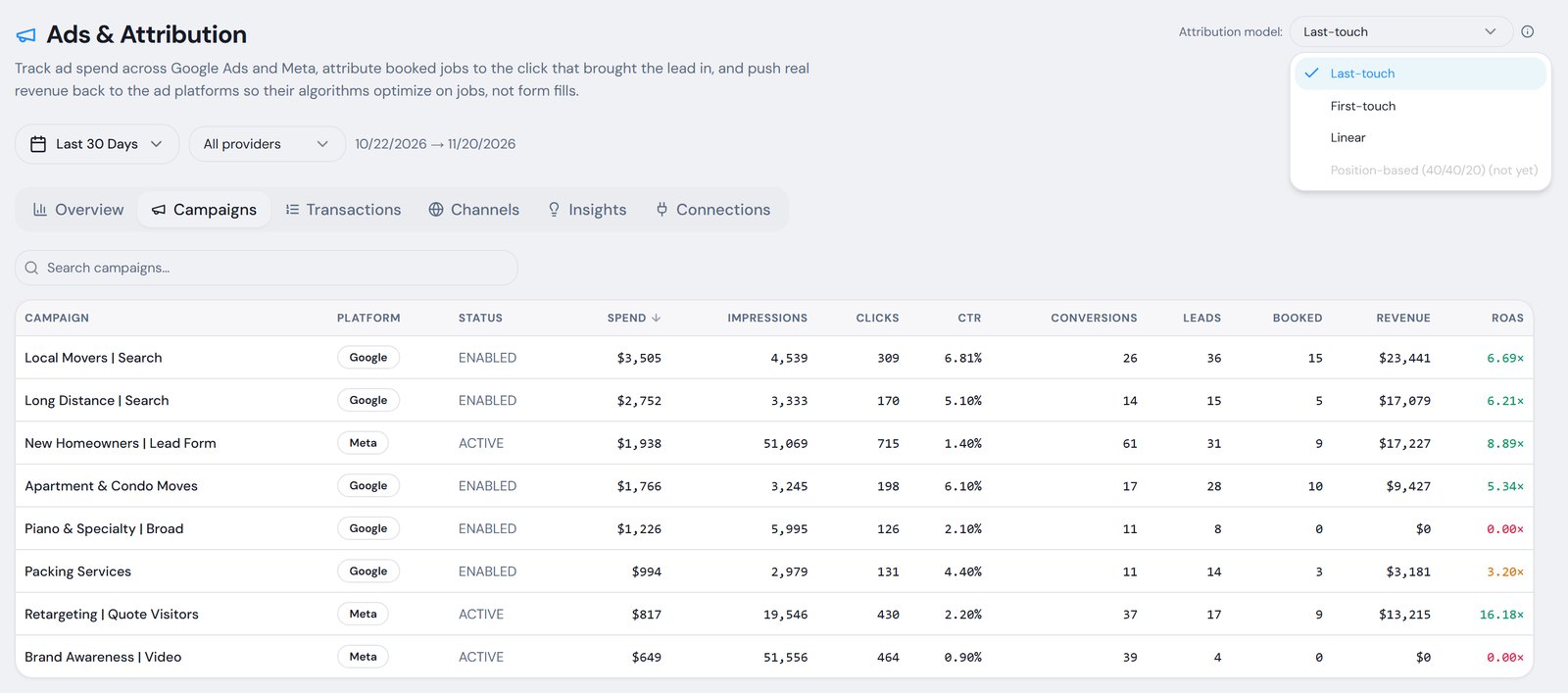
Spend, booked jobs, revenue, ROAS, profit ROAS, cost per booked job and cost per lead, for every campaign on both platforms. ROAS sits next to your break-even, and profit ROAS uses what the jobs actually made.

Three Attribution Models.
Last-touch, First-touch, Linear. Switch and watch the credit move between campaigns.
Profit ROAS.
Real profit on closed-out jobs, your trailing margin on the rest, against your break-even line.
Synced Automatically.
Connect Google Ads and Meta once. Spend, impressions, clicks and conversions keep themselves up to date.
Every Lead, Every Click
Tied To The Exact Click That Brought Them In.
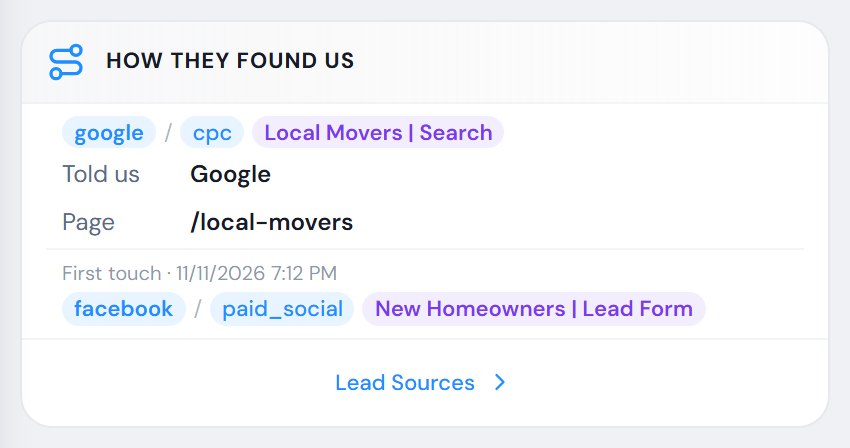
Every lead keeps where it first found you and what finally brought it back: source, medium, campaign, keyword, landing page and the Google or Meta click ID. It's right on the customer's record, in a card called “How they found us.”
- First touch and last touch, both kept
- The keyword they searched and the page they landed on
- Google and Meta click IDs, captured on the visit
Every Booked Job, Traced Back.
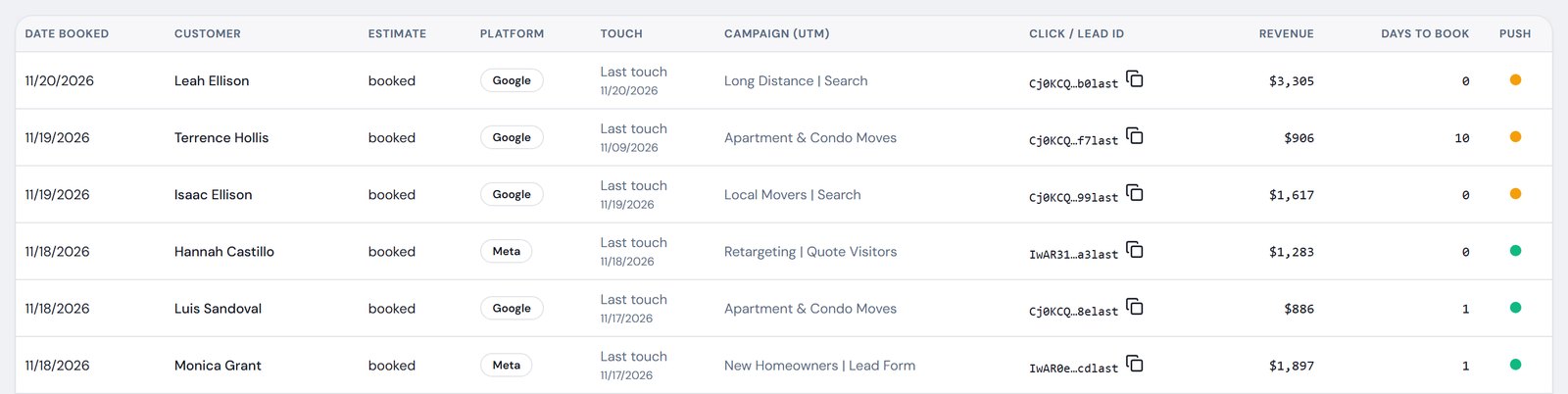
The Transactions tab lists every booked job with its customer, platform, touch, campaign, click ID, revenue and days to book, plus whether it has been sent back to the ad platform. Open a campaign and you get every customer it brought in.
Insights
Keywords That Book. Keywords That Burn Money.
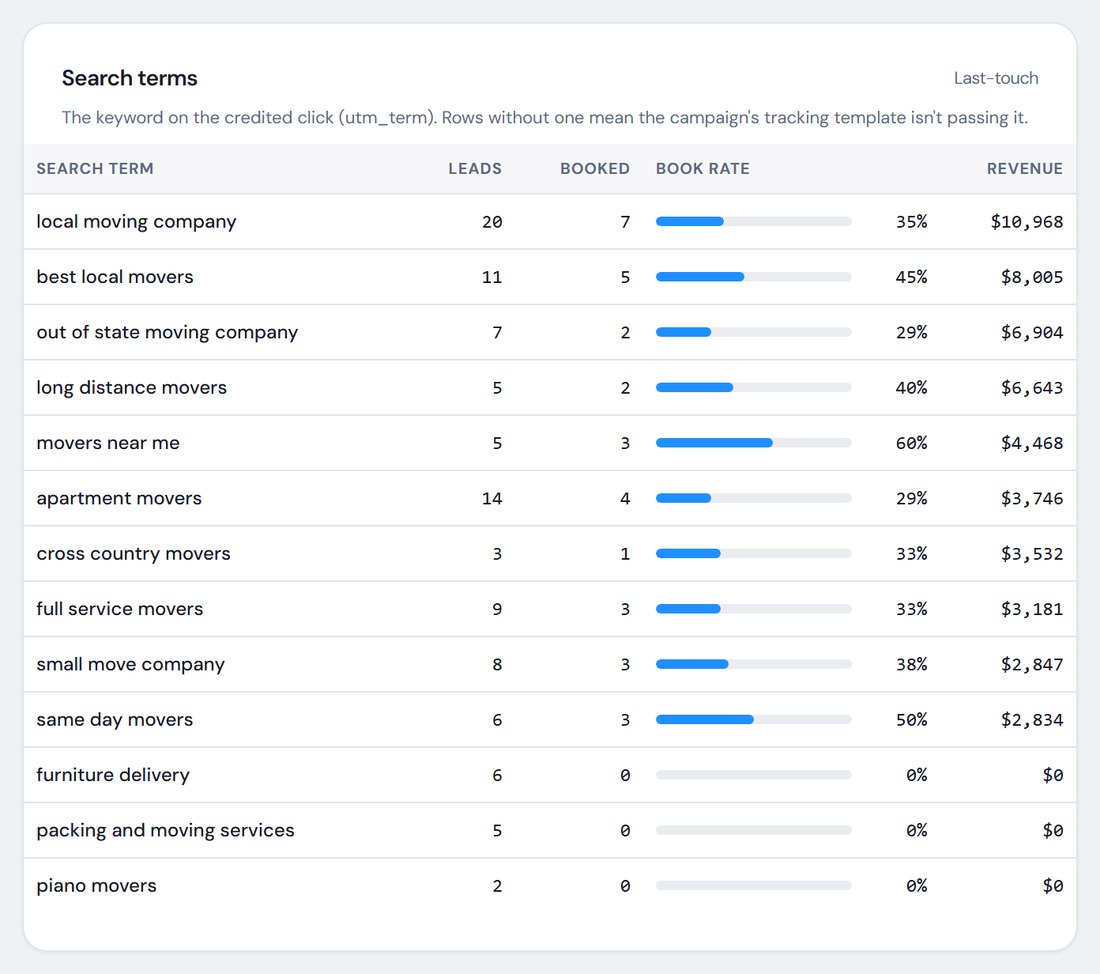
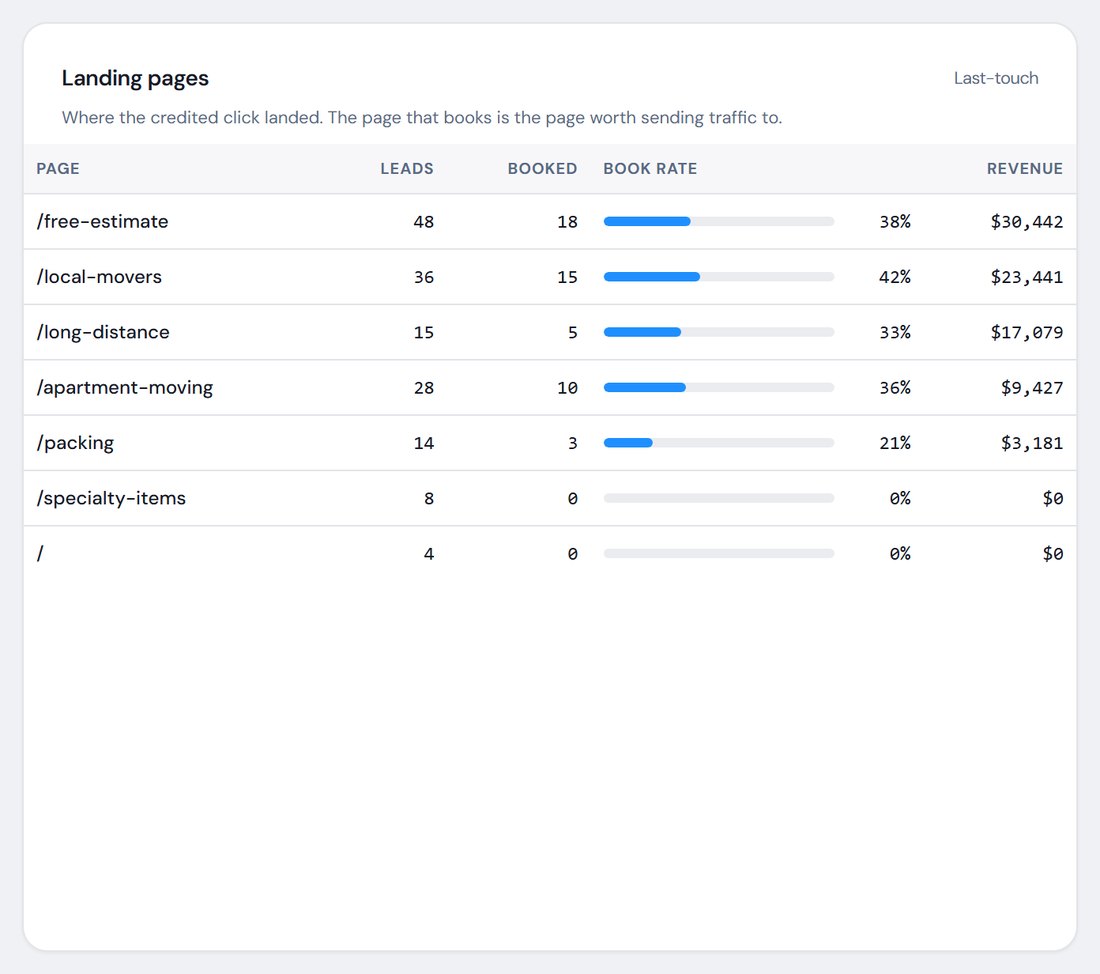
Leads, bookings, book rate and revenue for every search term, landing page, city and zip. The keyword with the most leads isn't always the one that pays, and the ones that book nothing are a list of negatives waiting to happen.
Search Terms.
The keyword on the click that got the credit, ranked by the revenue it booked.
Cities And Zips.
See where your ads book moves, and where they only buy clicks.
Click Cohorts.
Each week's clicks and how they're booking so far, so a young week doesn't look like a failing one.
Channels
Google Vs Meta, Branch By Branch.
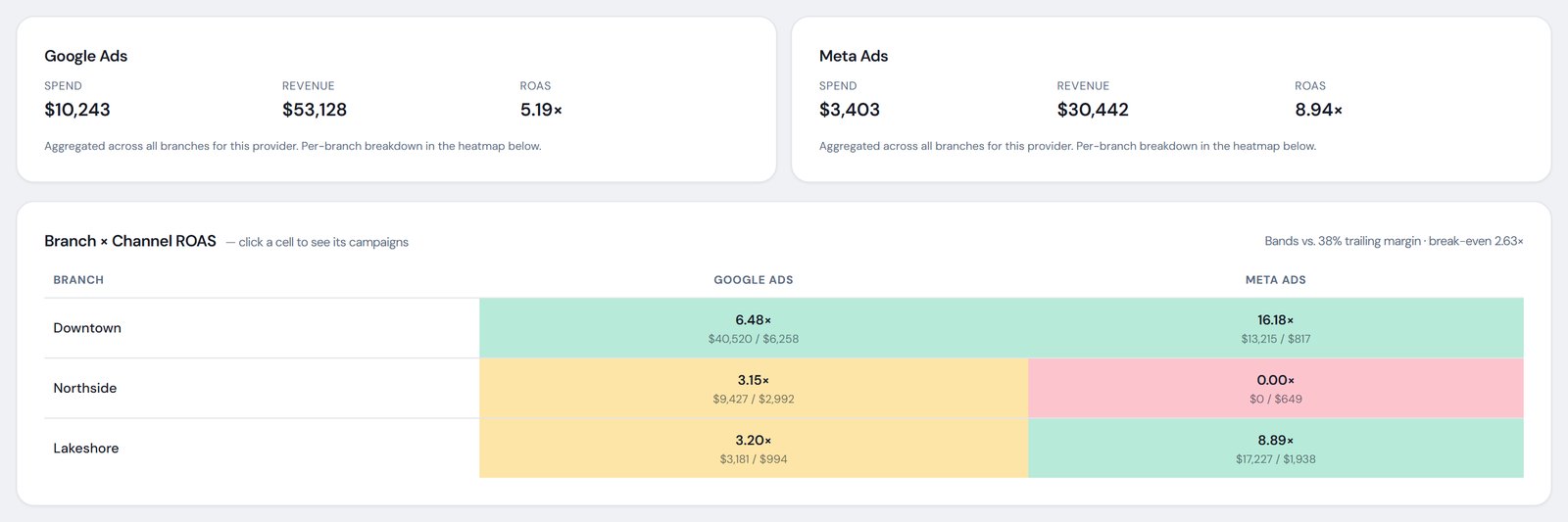
Running several locations? The branch × channel heatmap colors every cell against your break-even. Green pays, yellow is thin, red is a conversation. Click a cell to see its campaigns.
Booked → Google & Meta
With its real dollar value.
Conversion Push-Back
Teach The Algorithms Who Actually Books.
When a move books, MoveitPro sends it straight back to the platform that brought it in, with what the customer is paying. Smart bidding stops chasing form fills and starts finding more people like your real customers.
- Google Ads: a click conversion matched by the Google click ID, carrying the booked move's dollar value.
- Meta: a Purchase event matched by the Meta click ID, or a "Booked" CRM event matched by Meta's lead ID for lead-form leads, carrying the booked move's dollar value.
- A dot on every transaction shows whether it went through.
Attribution Health
Know How Much Of It You Can Trust.
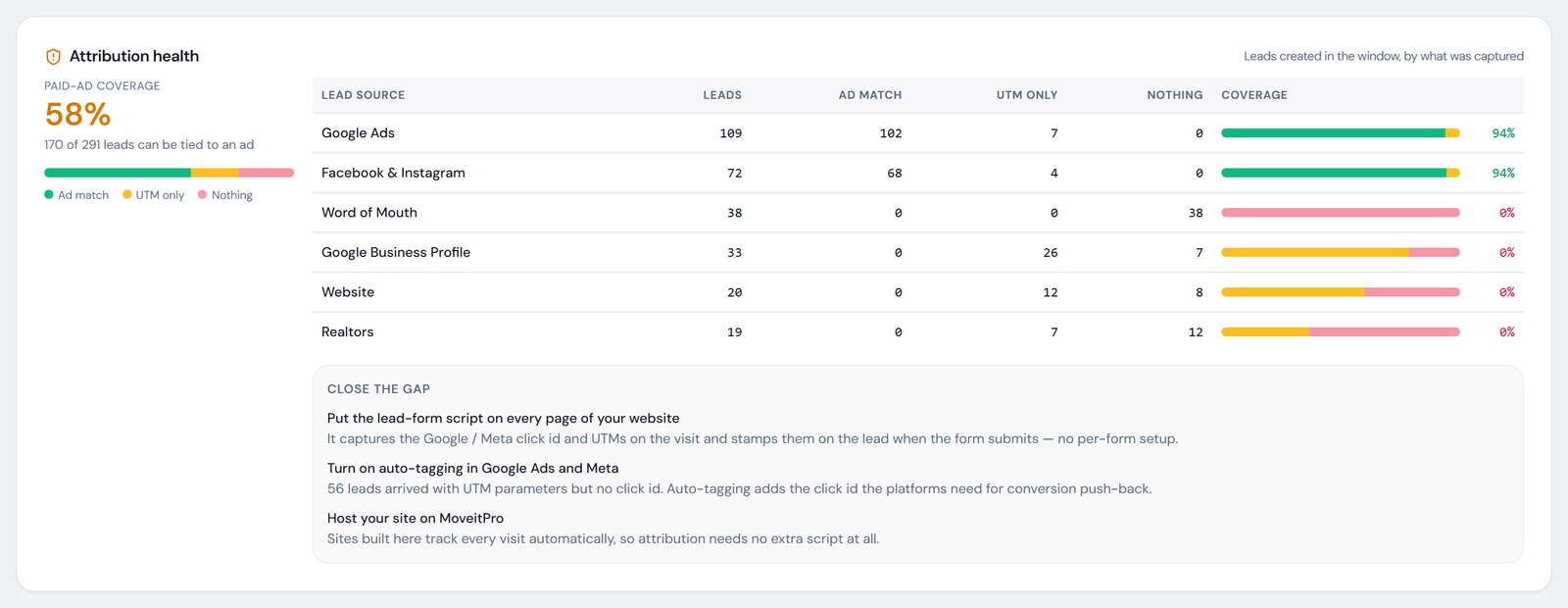
Reporting is only as good as the tracking under it. Attribution health shows, for every lead source, how many leads came in tied to an ad, with only UTMs, or with nothing, and tells you exactly how to close the gap.
For Owners And Their Agencies
Every Number Has A Name Behind It.
Open any campaign and see the customers it brought in, when they first touched the ad, what they booked and how many days it took. No more “trust us, it's working.” Whoever runs your ads gets the receipts, and so do you.
See Which Leads Book: The Close Ratio Dashboard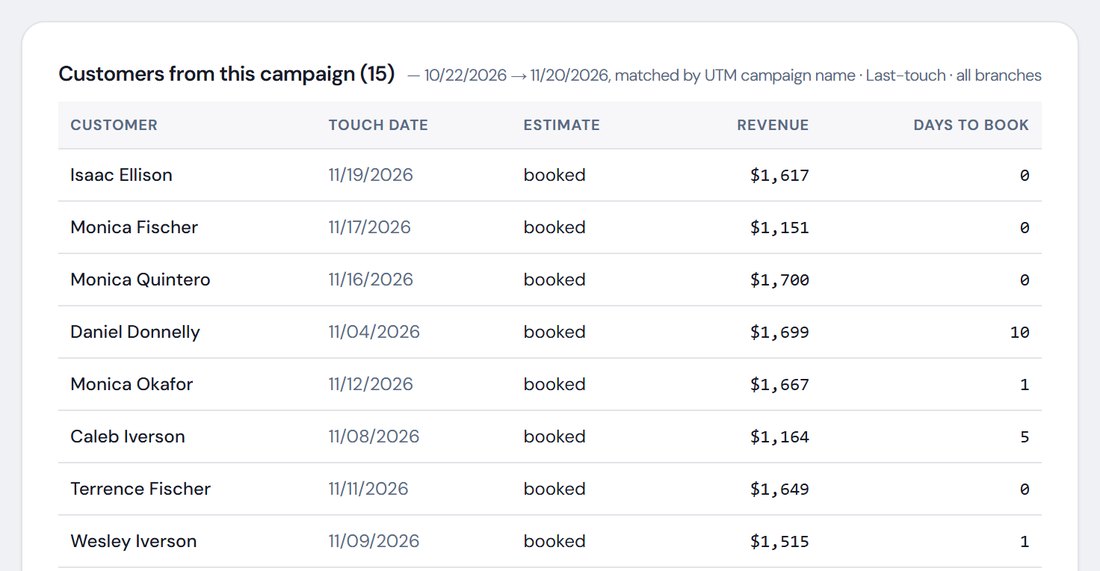
Customer names and figures shown are fictional sample data.
Ads & Attribution, Explained.
Which ad platforms does Ads & Attribution connect to?
Google Ads and Meta (Facebook and Instagram). Connect each account once from the Connections tab, and spend, impressions, clicks, conversions sync in for every campaign.
How is a lead tied to the ad that brought it in?
Every lead keeps its first touch and its last touch: the UTM source, medium, campaign, keyword and content, the landing page, the time, and the Google Ads or Meta click ID. Put the MoveitPro lead-form script on your website and it captures them on the visit; sites built in MoveitPro track every visit on their own. You see it all on the customer's “How they found us” card.
What's the difference between ROAS and profit ROAS?
ROAS is the revenue from booked jobs divided by what you spent. Profit ROAS uses what those jobs actually made: real profit on jobs that have closed out and your trailing margin on the rest, shown against your break-even, so a campaign that books cheap jobs can't hide behind a big revenue number.
Which attribution models can I use?
Last-touch, First-touch, Linear. Last-touch is the default, and switching models updates every number on the page.
Can I see which ad group or ad brought in a customer?
Revenue is credited by campaign, keyword (search term), landing page, city and zip. A campaign's page also lists its ad groups and ads, and every customer that campaign brought in.
What gets sent back to Google and Meta?
Every booked move, with its real dollar value. Google Ads gets a click conversion matched by the Google click ID, carrying the booked move's dollar value. Meta gets a Purchase event matched by the Meta click ID, or a "Booked" CRM event matched by Meta's lead ID for lead-form leads, carrying the booked move's dollar value. Their bidding then learns from who books, not who fills in a form.
Which plan includes it?
Ads & Attribution is part of MoveitPro+. You'll find it under Marketing → Ads & Attribution.
Live Now In MoveitPro+
Stop Guessing.
Know What Booked.
Every click, every campaign, every booked move, in the software that books them.