New In MoveitPro+ · Close Ratio Dashboard
Know Which Leads Actually Book.
The Close Ratio Dashboard in MoveitPro+ shows how often your leads book, split by lead source, first reply, sales rep and more, and what every gap below your average is worth. Spend where your leads book. Fix what doesn't.
Customer names and figures shown are fictional sample data.
Close Ratio By Lead Source
See Which Lead Sources Book.
Booked ÷ (booked + lost), for any date range and any branch. Pick a split and every group lines up against your average, above or below, so you can spend where your leads book and fix what doesn't. Lead source is each lead's referral source.
Split it any of 9 ways
- Lead source
- First reply time
- Sales rep
- Branch
- Move size
- Service type
- Day of the week
- Month
- Quote size
Turned Away: The Work You Had No Truck For.
Turned away counts the work you had customers for but no truck or crew to do, the leads lost for "No availability", and what that work was worth.
What It's Worth
Every Gap Has A Dollar Figure.
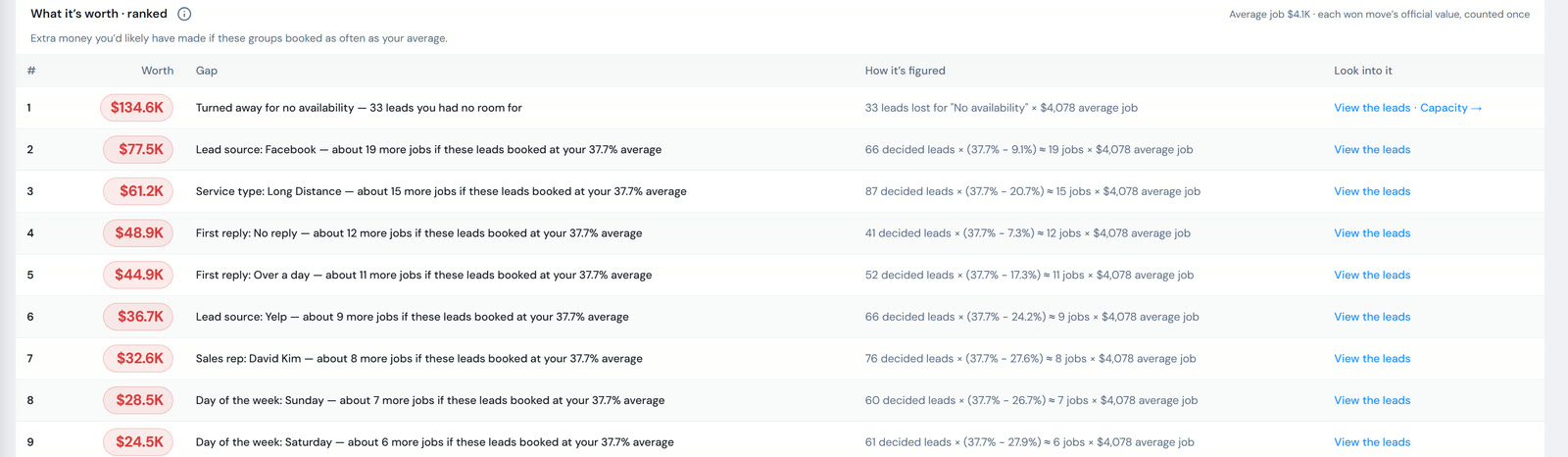
What it's worth ranks every group that books below your average and puts a number on it: "Extra money you'd likely have made if these groups booked as often as your average." The biggest gap sits at the top, so you know what to fix first.
First Reply
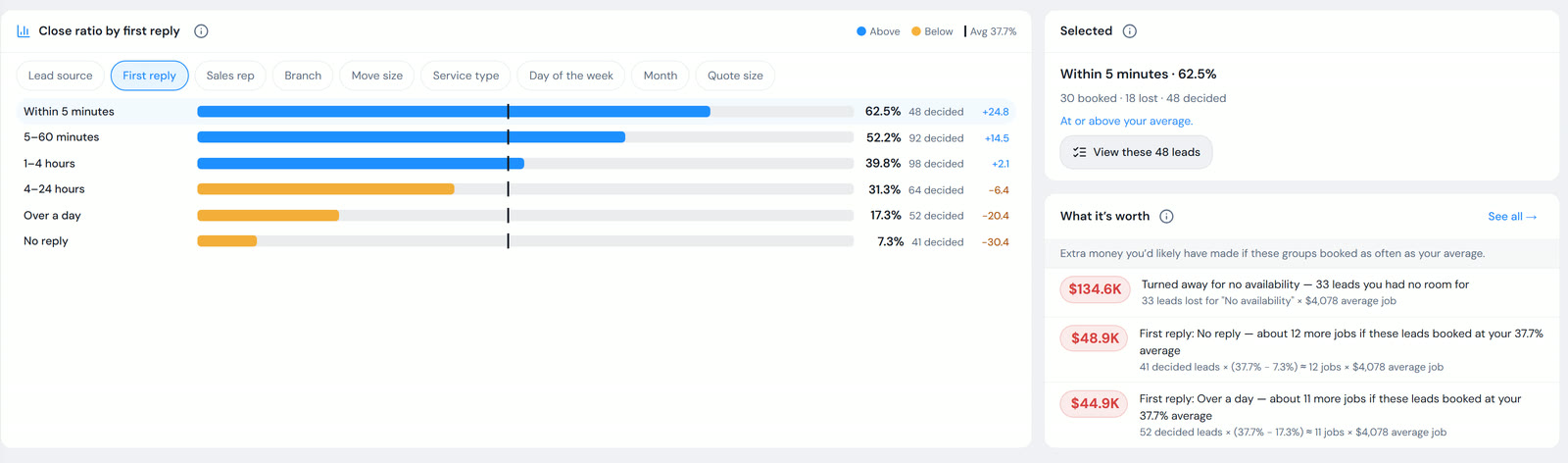
How Fast You Reply. How Much It Matters.
See how fast your team replies to each lead, and how reply speed affects booking, from within five minutes to no reply at all. Only a person's reply counts, so the number reflects your team.
Compare Two Splits
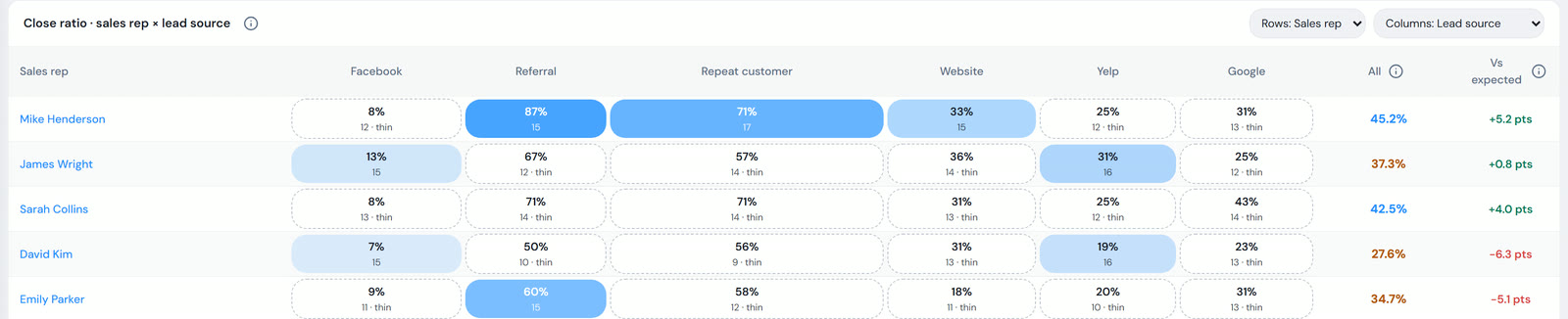
Compare Your Reps Fairly.
Put two splits side by side: reps or branches against lead source or day of the week. Vs expected takes easy referrals and hard paid leads out of the comparison, so nobody looks great for getting the easy leads or bad for getting the hard ones.
Win Chance, Checked.
Every lead carries a predicted win chance. Win chance checks whether those predictions came true, so you know how far to trust them.
Click Into The Leads
Click Any Number. See The Exact Leads.
Every number opens the leads behind it. Give a lost lead a reason, with AI suggesting one from the recorded call. It's a suggestion only: nothing is saved until you choose. Export any list to CSV or PDF.
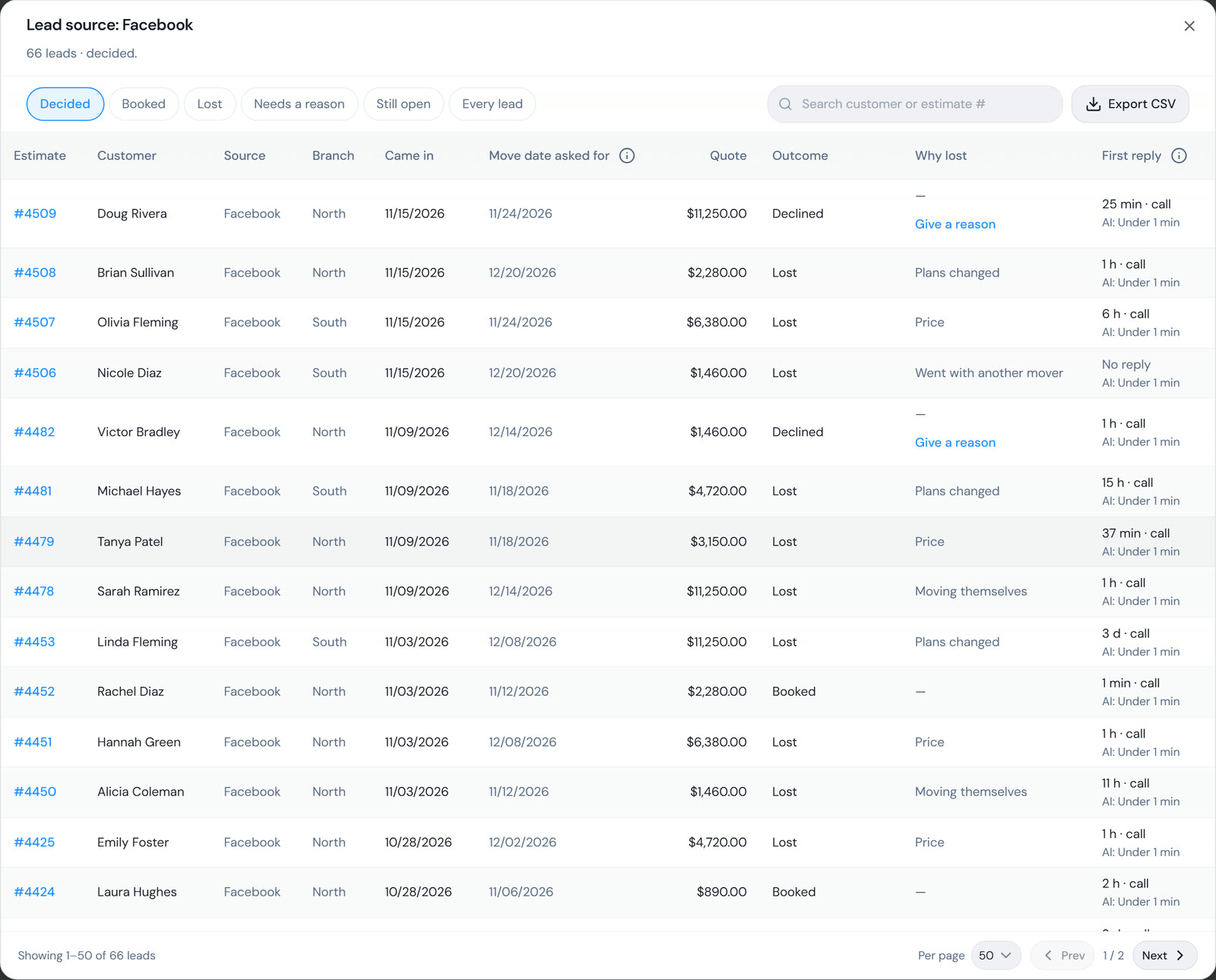
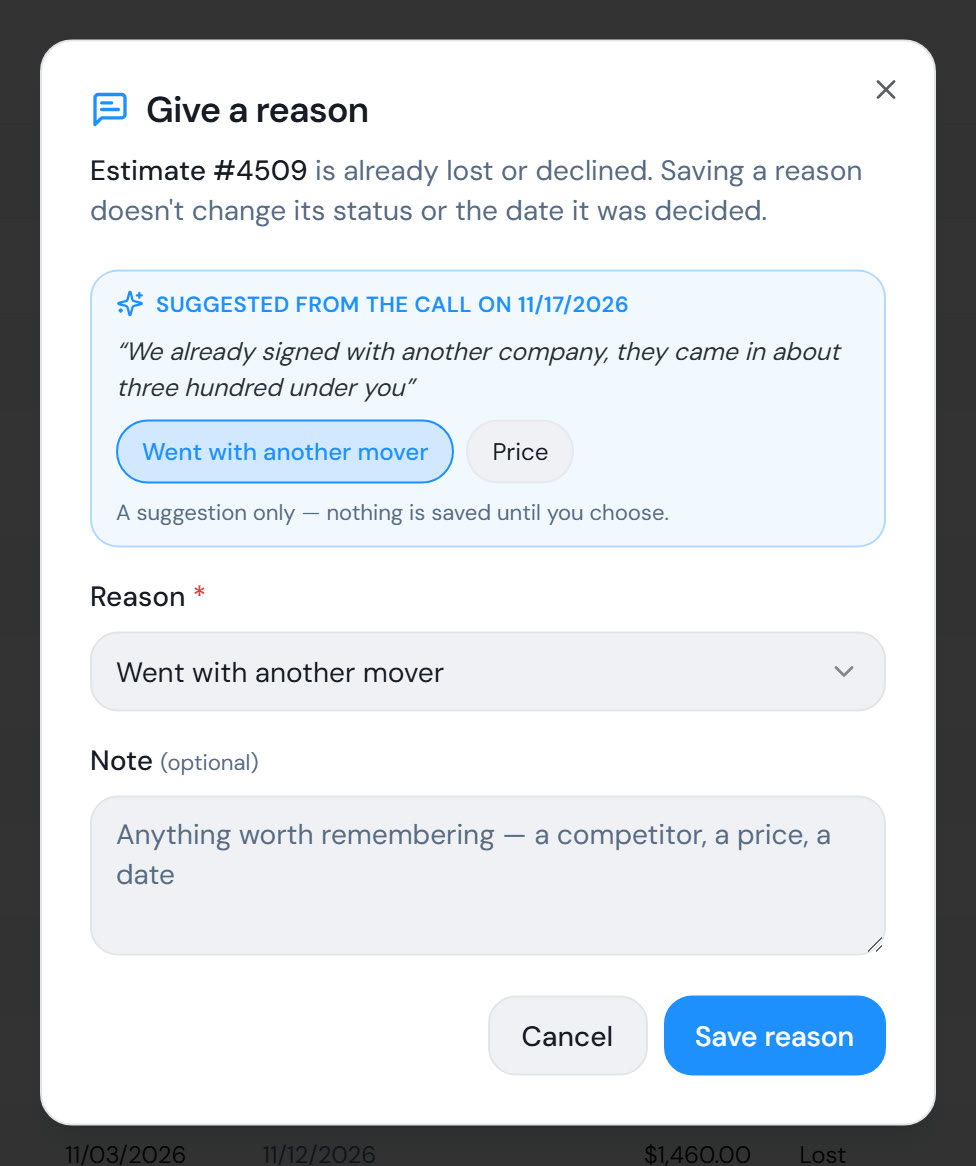
The AI suggests. You choose. Nothing is saved until you do.
Dashboard Tiles And Mippy
On Your Dashboard. In Your Monthly Recap.
Put the Close ratio and What it's worth tiles on your dashboard, next to the rest of your numbers. And Mippy AI gives you a monthly close-ratio recap, with a link straight into the report.
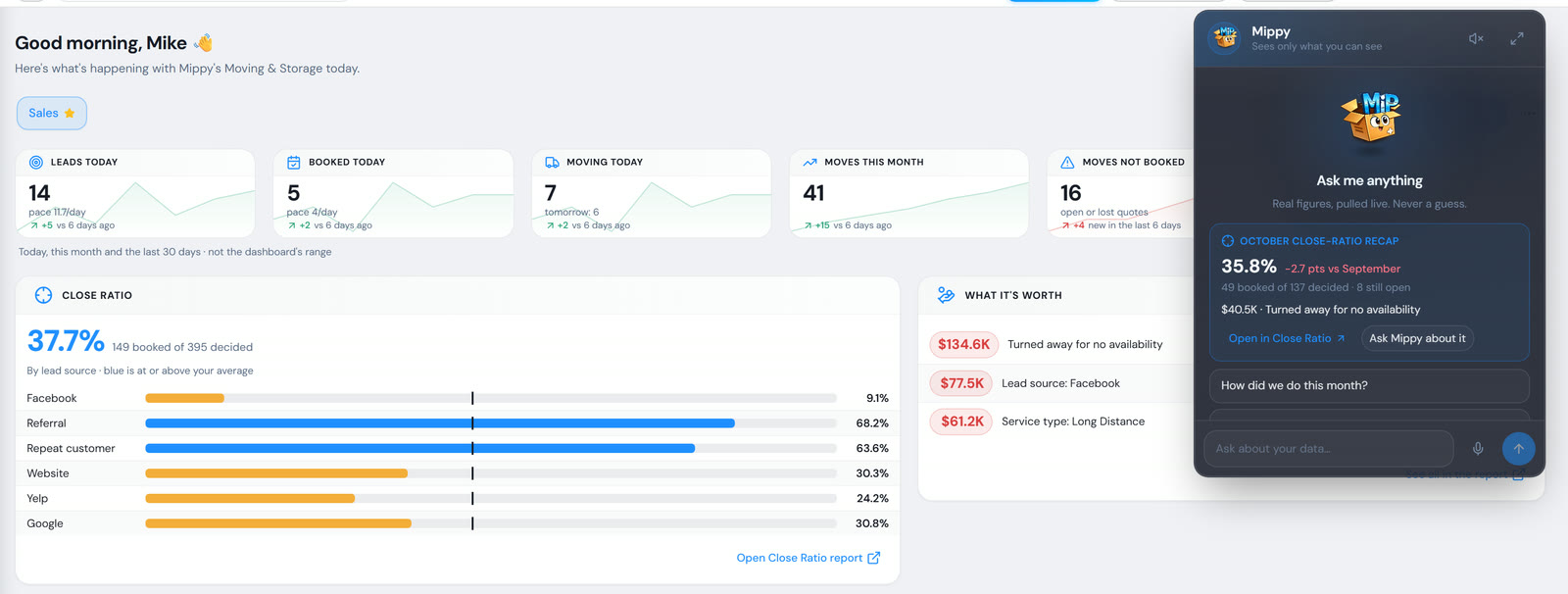
Customer names and figures shown are fictional sample data.
How It's Figured.
Booked ÷ (booked + lost)
The close ratio is the share of decided leads that booked, for any date range and any branch.
Lead date or move date
Measure by the date the lead came in, or by the move date the customer asked for.
Open quotes wait
A quote that's still open stays out of the ratio until it's decided, booked or lost.
The noise is left out
Duplicates and junk leads don't count, so the number is your real leads. Leads you brought over from your old software count like any other lead.
The Close Ratio Dashboard, Explained.
What is a close ratio?
Booked ÷ (booked + lost). In the Close Ratio Dashboard, open quotes stay out until they're decided, and duplicates and junk leads are left out. Imported leads count like any other lead.
Which plan includes the Close Ratio Dashboard?
MoveitPro+. In the app it's the Close Ratio report under Reports, with Close ratio and What it's worth tiles for your dashboard.
What does "What it's worth" show?
Every group that books below your average, ranked, with a dollar figure: the extra money you'd likely have made if those groups booked as often as your average.
What is lead source?
Lead source is each lead's referral source in MoveitPro+, so you see how the leads from each source book.
Does the AI set lost reasons on its own?
No. When you give a lost lead a reason, the AI suggests one from the recorded call. It's a suggestion only, and nothing is saved until you choose.
MoveitPro+ Only
See Which Of Your Leads Book.
Book a demo and we'll walk through the Close Ratio Dashboard in MoveitPro+ with your team: which lead sources book, and what each gap is worth.