Training Center
Build the training your team actually needs — then assign it, track it, and prove it happened. One click from dispatch.
Every moving company trains. Almost none of it is written down. It lives in a foreman's head, in a laminated sheet in the cab, in the thing the office manager says on someone's first Tuesday. The Training Center is now live in your account — a complete training platform built into the software you already run your company on.
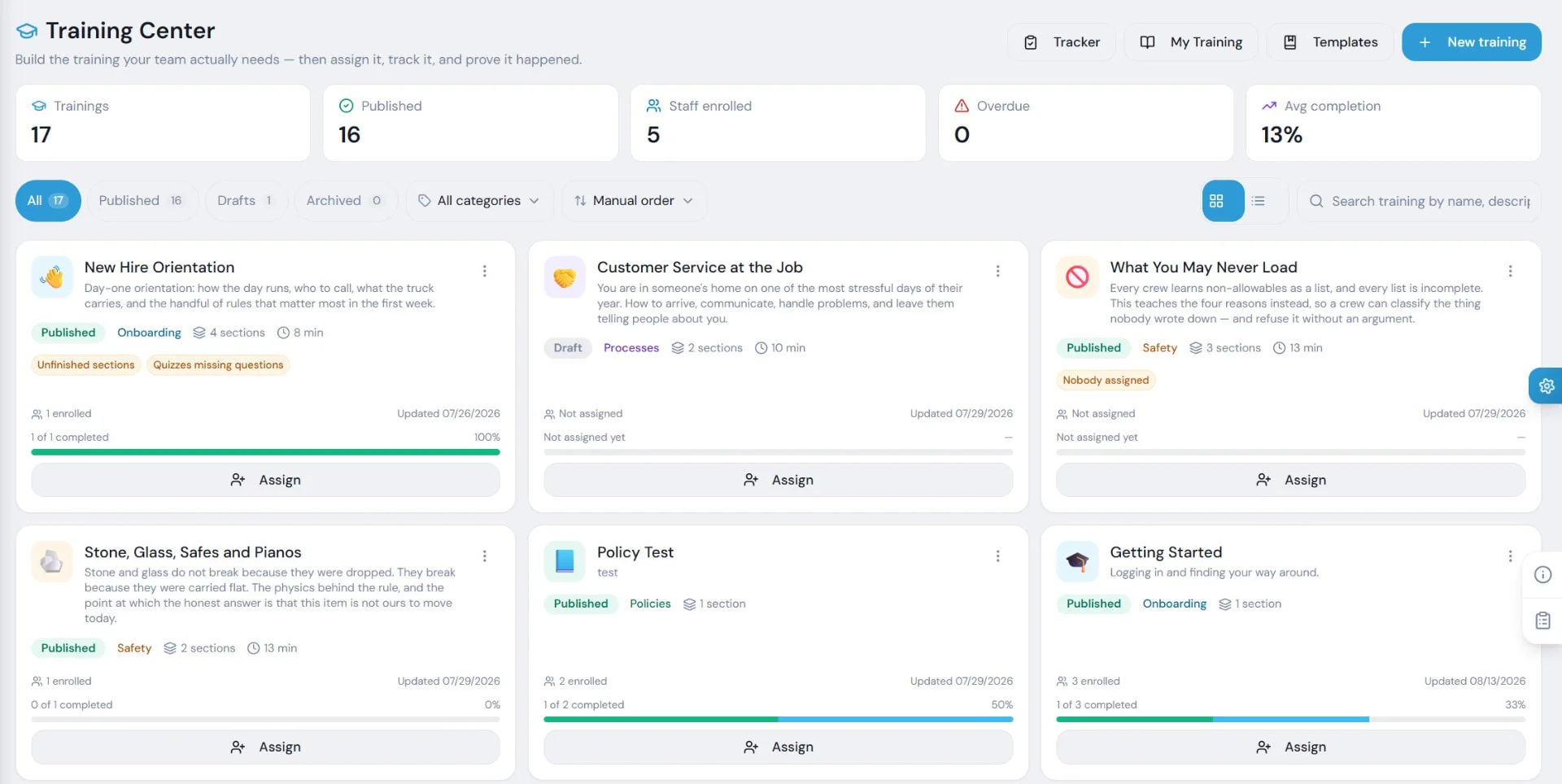
The State Of Your Whole Program, At A Glance
Course cards show status, category, sections, duration, enrollment, and progress. And they tell you the truth when something is not ready.
You Don't Start With A Blank Page
Pick a course and it is copied into your library as your own. Rewrite it, cut a section, add your policy, swap in your video, change the quiz.
Getting Started
- New Hire Orientation
- Day-one basics
Field Craft
- Stone, Glass, Safes and Pianos
- Why stone breaks because it was carried flat
Safety & Handling
- What You May Never Load
- The four reasons to refuse anything
Conduct & Service
- Conduct Inside an Occupied Home
- Protecting the Home
- When It Goes Wrong On Site
- Earning the Review, Then Asking
Office & Dispatch
- How the day runs
- Who to call
- What gets escalated
Sales & Estimating
- What Each Estimate Commits You To
- Payment, Deposits and the Line
Regulation & Liability
- Valuation Is Not Insurance
- Who Regulates Your Local Moves
- DOT Basics for a Local Mover
- Buildings, Elevators and COIs
However Your Team Learns
Write it.
Full rich text — headings, lists, images, formatting. Break a course into sections, and sections into steps.
Film it.
Add up to 10 videos to a single step. Show the four-man carry, the stair-crawl on a piano, or what a properly wrapped dresser looks like.
Test it.
Multiple choice, multi-select, or true/false. Graded server-side so correct answers never reach the browser.
Make them sign it.
Any section can require a signature. We freeze the exact text they agreed to and fingerprint it. Months later, you can prove what they read.
Get help writing it.
Built-in AI assist drafts outlines and quiz questions. It proposes; it never publishes. You edit and approve every word.
It Works With No Signal
Your crews get a Training tab right in the crew app, alongside their jobs. They read steps, watch videos, take quizzes, and sign policies from their phone — on the truck, between stops, in a basement.
- Training tab inside the crew app, next to jobs.
- Read steps, watch videos, take quizzes, sign policies from a phone.
- Content cached to the device for offline use.
- Completions queue and sync automatically when signal returns.
Assign The Right People. Track The Real Work.
Assign Exactly Who Needs It
One employee, a permission group, an entire branch, or the whole company. Set a due date in days and everyone qualified gets enrolled automatically. Mark a course discoverable and your team can self-enroll.
Overdue? One Button.
Remind everyone who's late with a single click. The Tracker grid shows people down the side, curriculum across the top, and the real state of every square.
Track Training That Happens On A Truck
A trainer can check someone off directly, and we record who verified the skill and that it was a trainer — not the learner. Hands-on skills verified by a human, tracked in the same system, with provenance attached.
- Grid of people vs. curriculum with the real state of every square.
- Trainers check off hands-on skills with provenance attached.
- Completion matrix, overdue list, and quiz results — with CSV export.
- PDF certificates print the moment someone finishes, with admin-granted status noted.
MVR for John D. expires in 14 days. Renewal reminder sent.
Training Is What You Teach. Certifications Expire.
Upload the document. Set the expiry date. The system tracks it, flags it before it lapses, marks it expired the day after, and reminds you ahead of time. Submissions can be reviewed and approved.
No more finding out a driver's med card expired because he got pulled over.
You Control Who Sees What
Six separate permissions, because "can see the training dashboard" should never mean "can read everyone's driving record."
View My Training
Take assigned courses.
Manage Training Content
Author, edit, and publish.
Assign Training
Enroll people and set due dates.
View Training Reports
Completion, overdue, and quiz results.
View Certifications
Read-only access to credential vault.
Manage Certifications
Upload, review, and approve sensitive docs.
What This Replaces
If you are paying for a separate training platform, you are paying for a tool that does not know what a COI is, has never heard of a long carry, cannot see your employee roster, and does not work when your crew is in a basement.
Questions
Training Center FAQ
Is the Training Center an extra cost?
No. It is included with MoveitPro+. There is no separate subscription, no per-seat training fee, and no second login.
Can crews use it without cell signal?
Yes. Content is cached to the device. Completions recorded offline sync automatically when the phone reconnects.
How many ready-made courses are included?
33 courses written specifically for moving and storage, organized on shelves so you can find and assign them quickly.
Can we edit the included courses?
Yes. Copy any course into your library, then rewrite, cut, add, or replace content — including your own videos and policies.
How do signatures work?
A section can require a signature. We freeze the exact version of the text the person signed and fingerprint it. Edit the policy later and re-signatures are required.
What happens if a quiz has no questions?
The system flags it and will not let you publish. A quiz that auto-passes everyone is worse than no quiz.
Can we track in-person, hands-on training?
Yes. The Tracker lets a trainer check someone off directly, with a record of who verified the skill and when.
Does it handle expiring certifications?
Yes. The Certification Vault tracks MVRs, DOT medical cards, hazmat, forklift, and any custom credential with expiry dates and reminders.

Ready for the Next Chapter?
MoveitPro+ is now live — and we're onboarding a handful of companies each day to ensure every customer gets a white-glove setup. Reserve your spot today.
Book a demo • We will review your current lead flow, dispatch process, migration needs, and fastest path to launch